Upload Attachments
As part of the registration process, the system will require you to upload worksheets from the most-recently filed Cost Report to support the registration Qualification Information. Failure to upload the required documentation before submitting the registration will result in rejection of the registration for the quarter. Required attachments vary by hospital type.
|
Hospital Type |
Cost Report Worksheets |
|||
|---|---|---|---|---|
|
S |
S-2 |
S-3 |
E (Part A) |
|
|
Yes |
Yes |
No |
Yes |
|
|
Yes |
Yes |
No |
No |
|
|
Freestanding Cancer Hospital (CAN) |
Yes |
Yes |
No |
Yes |
|
Yes |
Yes |
Yes |
No |
|
|
Yes |
Yes |
No |
Yes |
|
|
Yes |
Yes |
No |
Yes |
|
 Disproportionate Share Hospital (DSH)
Follow these steps to upload one or more attachments:
-
You will be navigated to the Attachments section after selecting Next from the Qualification Info section or by selecting Attachments from the side navigation panel of the submission.

 Selecting from Existing Attachments
Clicking the Select from Existing Attachments button displays a list of attachments that have already been uploaded.
If you are the AO or PC for the parent entity, the list will show all attachments uploaded for the parent and for all of its children.
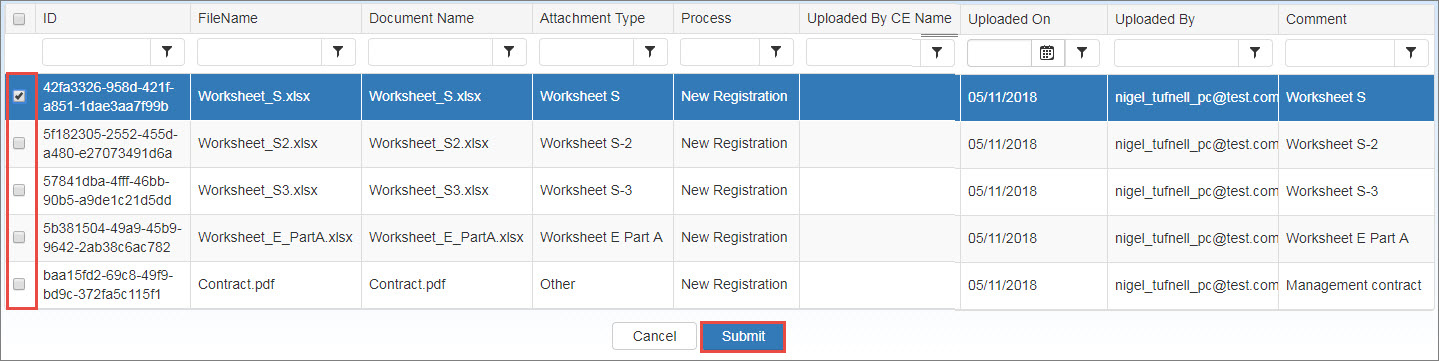
Click the checkbox for the files you want to attach and click the Submit button to add them to the hospital's Attachments page.
-
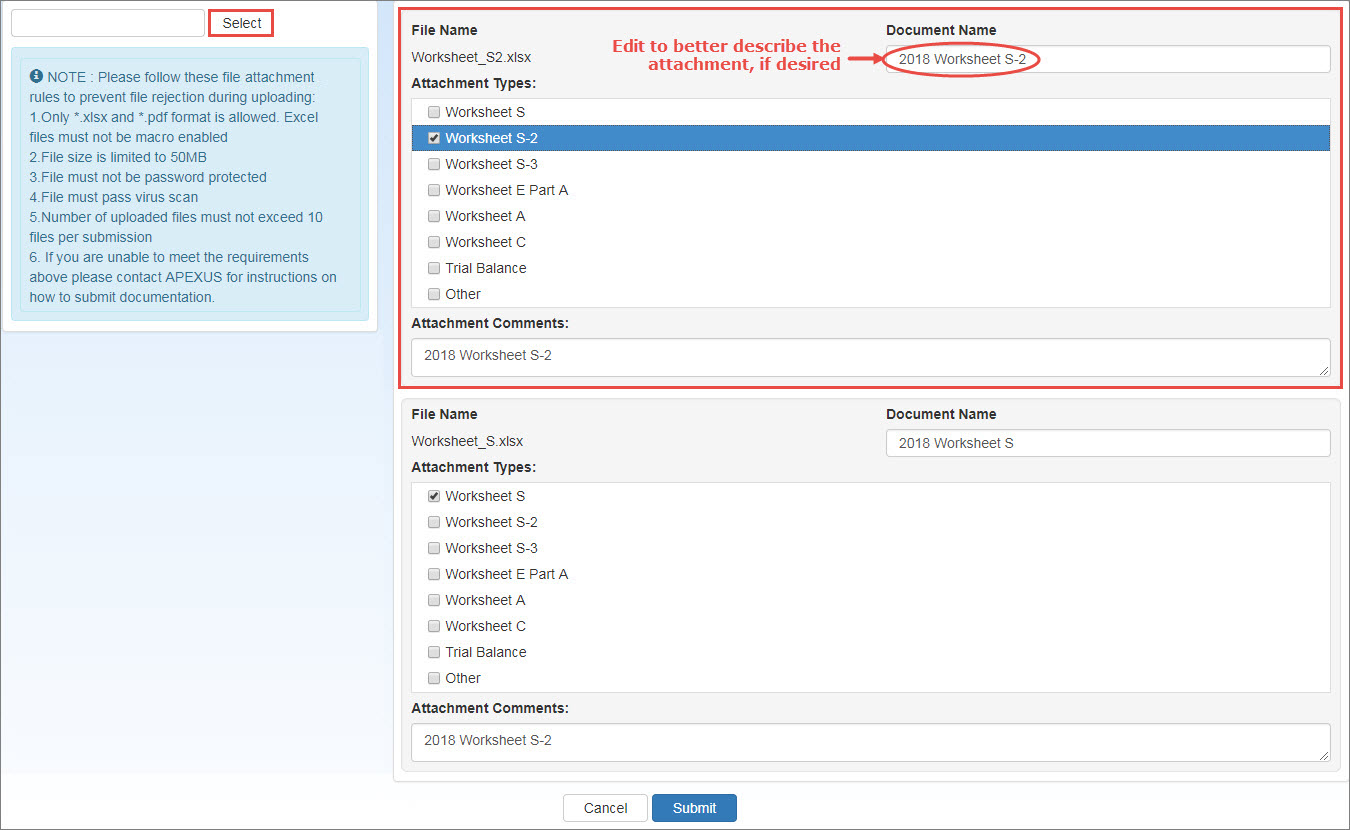
When the attachments upload selection page is displayed, click the Select File button, navigate to the file you want to upload, and select it.
Follow these file attachment rules to prevent rejection during uploading:
- Only Microsoft Excel (xlsx) and Adobe PDF formats are allowed. Excel files must not be macro-enabled.
- File size is limited to 50MB.
- Files must not be password protected.
- Files must pass virus scan.
- Number of uploaded files must not exceed 10 files per submission.
-
As each file is selected, it will appear on the attachments page.
-
Use the Edit icon to select Attachment Type, add a Comment, or update the Document Name to better describe the attachment if desired.
-
To remove the selected attachment, Select the Delete icon available for each attachment.

-
- Repeat the steps above to select and identify additional attachments.
- Click the Next button to proceed when finished selecting attachments.
| Column | Description |
|---|---|
|
FileName |
Click the link to open the attachment with the application that created it (e.g., Excel). |
|
Document Name |
Optional user-entered description of the attachment (defaults to the file name). |
|
Attachment Type |
User selected type identifier. |
|
Uploaded On |
Date when they attachment was uploaded. |
|
Uploaded By |
Email address of the user who uploaded the attachment. |
|
Comment |
User comment entered when the attachment was uploaded. |
|
Modify Attachments |
|
|
Upload Attachments |
Upload additional attachment files |
|
Reuse Previously Uploaded |
Select additional files from a list of attachments that have already been uploaded. |
|
Cancel |
Cancel the registration and return to the home page. |
|
Prev |
Return to the previous page. |
|
Next |
Click this button to accept the attachments and proceed. |